




How Do Graphics Cards Work? A Simple Guide to GPUs
If you play modern video games, edit videos, work with 3D applications, or use software that requires heavy visual processing, you have probably heard the term GPU.
GPU stands for Graphics Processing Unit.
It is the main processor responsible for handling many of the calculations required to create and display images, animations, videos, and 3D environments.
But how does a graphics card actually work?
Why does it matter for gaming?
And what do terms such as VRAM, GPU cores, clock speed, and ray tracing actually mean?
Let’s break it down.
What Is a Graphics Card?
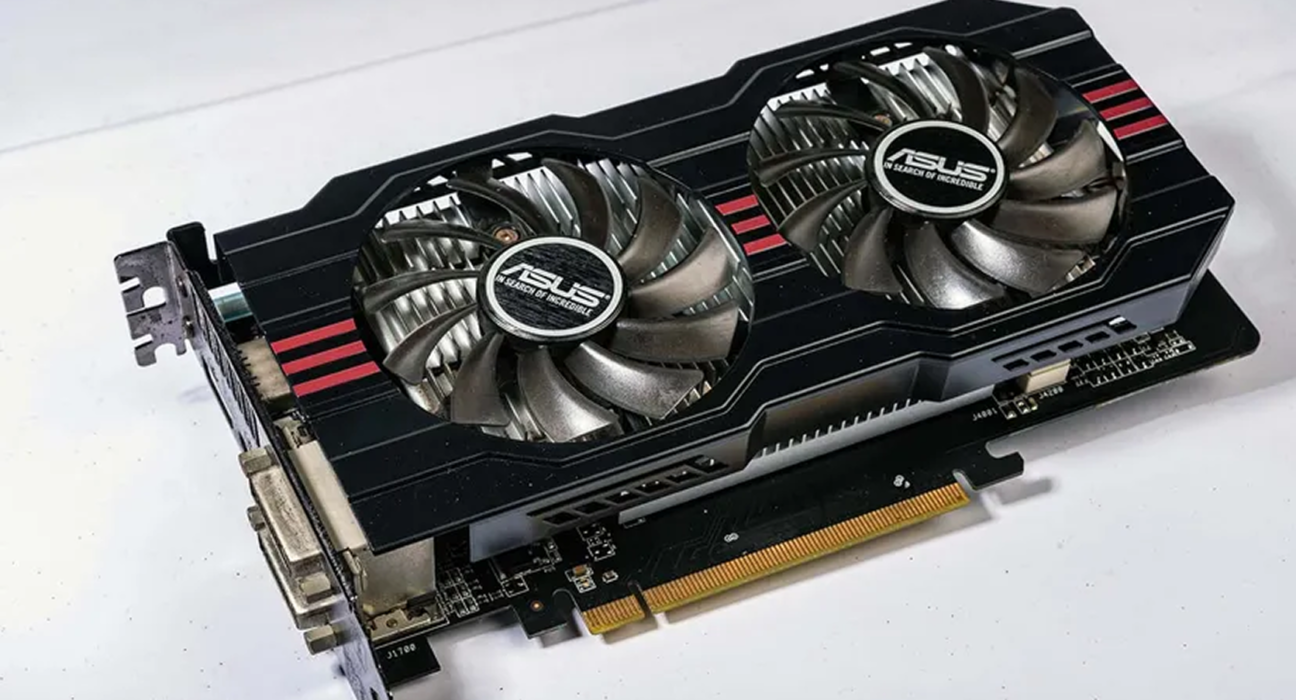
A graphics card is a computer component designed primarily to process visual information.
It contains a GPU along with other components such as:
- Video memory
- Power circuitry
- Cooling systems
- Memory controllers
- Display outputs
- Supporting hardware
The GPU performs large numbers of calculations simultaneously and sends the resulting image information to your display.
A graphics card can be integrated directly into a processor or exist as a separate expansion card.
What Is a GPU?
The GPU is the processing unit at the center of graphics processing.
Unlike a typical CPU, which is designed to handle a wide variety of tasks, a GPU is optimized for performing many similar calculations at the same time.
This makes GPUs particularly useful for:
- 3D graphics
- Image processing
- Video processing
- Scientific computing
- Artificial intelligence
- Machine learning
- Simulation
- Gaming
The ability to process many operations simultaneously is one of the main reasons GPUs are so powerful for visual workloads.
CPU vs GPU
A computer’s CPU and GPU work together, but they have different strengths.
| CPU | GPU |
|---|---|
| General-purpose processor | Specialized parallel processor |
| Handles many types of tasks | Optimized for large-scale parallel calculations |
| Usually has fewer powerful cores | Usually has many smaller processing units |
| Runs operating system and applications | Processes graphics and other parallel workloads |
| Important for overall system performance | Especially important for graphics performance |
Neither component completely replaces the other.
A gaming computer needs both.
How Does a Graphics Card Create an Image?
When you play a game, the computer has to continuously create frames.
A simplified process looks like this:
Game software → CPU → GPU → Frame rendering → Display
The game sends information about the environment to the computer.
The CPU handles many game-related calculations, while the GPU processes the visual information.
The GPU then calculates what the scene should look like from the player’s viewpoint.
This can include:
- Geometry
- Lighting
- Shadows
- Textures
- Reflections
- Colors
- Effects
- Depth
The final frame is then sent to the monitor.
This process happens repeatedly—often dozens or hundreds of times per second.
What Are GPU Cores?
Modern GPUs contain large numbers of processing units.
Different manufacturers use different names and architectures for these units, but the basic idea is similar.
Instead of relying on a small number of general-purpose cores like a CPU, a GPU can use many processing units to perform large numbers of calculations simultaneously.
This parallel design makes GPUs particularly effective for graphics workloads.
However, you should not compare GPUs simply by counting cores.
Different GPU architectures can have very different performance even when their core counts appear similar.
What Is VRAM?
VRAM stands for Video Random Access Memory.
It is memory specifically used by the graphics processor.
VRAM can store information such as:
- Textures
- Frame buffers
- 3D models
- Rendering data
- Shaders
- Other graphics-related information
Think of VRAM as a workspace that allows the GPU to quickly access the data it needs.
Why Does VRAM Matter for Gaming?
Modern games can use large amounts of graphics data.
Higher resolutions and more detailed textures can require more VRAM.
For example, a game running at a higher resolution may require more memory to store and process visual information.
However, having more VRAM does not automatically make one graphics card faster than another.
GPU architecture, processing power, memory bandwidth, software optimization, and many other factors also matter.
What Is GPU Clock Speed?
GPU clock speed describes how quickly certain parts of the GPU operate.
It is usually measured in MHz or GHz.
A higher clock speed can contribute to better performance, but clock speed should not be considered independently.
Two GPUs with different architectures can deliver very different performance at similar clock speeds.
That is why real-world benchmarks are generally more useful than comparing clock speed alone.
What Is Memory Bandwidth?
Memory bandwidth describes how much data can be transferred between the GPU and its memory over a given period.
Higher memory bandwidth can be useful when the GPU needs to move large amounts of graphics data quickly.
It depends on factors including:
- Memory type
- Memory speed
- Memory bus width
- Architecture
Memory bandwidth is one part of the overall GPU performance equation.
What Are Shaders?
Shaders are programs that tell the GPU how to process different parts of a scene.
They can be used for tasks involving:
- Lighting
- Surface appearance
- Shadows
- Colors
- Reflections
- Special visual effects
Modern games rely heavily on shaders to create realistic and complex visuals.
When developers want a material to look like glass, metal, water, or fabric, shaders can play an important role in determining how that surface appears.
What Is Rasterization?
Rasterization is one of the traditional techniques used to turn 3D objects into the 2D images displayed on your screen.
A simplified process looks like this:
3D scene → Geometry processing → Rasterization → Shading → Final image
The GPU determines which parts of objects are visible and converts the geometry into pixels.
Rasterization has been the foundation of real-time 3D graphics for decades and remains extremely important in modern games.
What Is Ray Tracing?
Ray tracing is a rendering technique designed to simulate how light behaves.
Instead of relying only on traditional approximations, ray tracing can simulate rays of light interacting with objects in a scene.
It can improve effects such as:
- Reflections
- Shadows
- Global illumination
- Lighting
- Transparency
Ray tracing can produce more realistic visuals, but it is computationally demanding.
Modern GPUs therefore include specialized hardware and technologies designed to make ray-traced rendering more practical.
What Is Path Tracing?
Path tracing is a more comprehensive form of ray-based rendering.
It attempts to simulate multiple interactions of light throughout a scene.
This can produce highly realistic lighting, but it requires significant computational resources.
For this reason, path tracing is generally more demanding than traditional rasterization and many forms of ray tracing.
What Is Frame Rate?
Frame rate refers to the number of frames displayed per second.
It is commonly expressed as FPS, or frames per second.
For example:
- 30 FPS = 30 frames per second
- 60 FPS = 60 frames per second
- 120 FPS = 120 frames per second
- 240 FPS = 240 frames per second
A higher frame rate can make motion appear smoother, particularly in fast-paced games.
However, achieving a high frame rate depends on the entire system, not only the graphics card.
What Is Resolution?
Resolution describes the number of pixels displayed on the screen.
Common gaming resolutions include:
- 1920 × 1080
- 2560 × 1440
- 3840 × 2160
Higher resolutions require the GPU to process more pixels.
For example, 4K resolution contains significantly more pixels than 1080p.
This means rendering at higher resolutions generally requires more graphics processing power.
Why Does Resolution Affect GPU Performance?
Imagine that the GPU needs to calculate every pixel in a frame.
A higher-resolution image contains more pixels.
Therefore:
More pixels → More calculations → Greater GPU workload
This is one reason why a graphics card that performs well at 1080p may struggle to maintain the same frame rate at 4K.
What Is Upscaling?
Upscaling technology allows a game to render at a lower internal resolution and then produce an image that appears closer to a higher target resolution.
Modern upscaling technologies can use sophisticated algorithms and AI-based techniques to improve image quality.
The goal is to reduce the GPU workload while maintaining a visually appealing image.
This can help increase frame rates in demanding games.
What Is Frame Generation?
Frame generation technologies create additional frames between traditionally rendered frames.
The goal is to increase the displayed frame rate without requiring the GPU to render every displayed frame entirely from scratch.
This can make supported games appear smoother.
However, frame generation is different from simply increasing native rendering performance, and factors such as latency and image quality should also be considered.
What Is a GPU Bottleneck?
A bottleneck occurs when one component limits the performance of another.
For example, if your graphics card is working at its maximum capacity while the CPU has additional capacity available, the GPU may be the limiting component.
In another game, the CPU may become the limiting factor instead.
There is no single component that is always the bottleneck.
It depends on:
- Game
- Resolution
- Graphics settings
- Hardware
- Frame-rate target
- Software optimization
Integrated Graphics vs Dedicated Graphics
There are two broad types of graphics solutions.
Integrated Graphics
Integrated graphics are built into a processor or system-on-chip.
They typically share system resources and are designed for lower power consumption and everyday tasks.
They can be suitable for:
- Web browsing
- Office applications
- Video playback
- Lightweight gaming
- Basic creative work
Dedicated Graphics
A dedicated graphics card has its own GPU and graphics memory.
It is generally designed for more demanding workloads such as:
- High-end gaming
- 3D rendering
- Professional video editing
- AI workloads
- Advanced graphics applications
Does a Better GPU Always Mean Better Gaming?
Not necessarily.
Gaming performance also depends on:
- CPU
- RAM
- Storage
- Game engine
- Drivers
- Resolution
- Graphics settings
- Cooling
- Power limits
- Game optimization
A powerful graphics card paired with a weak CPU may not deliver the performance you expect.
The entire system needs to be balanced.
Why Do Graphics Cards Get Hot?
GPUs perform a large number of calculations and consume electrical power while doing so.
Some of that electrical energy becomes heat.
The graphics card therefore requires a cooling system.
Common cooling components include:
- Heatsinks
- Fans
- Heat pipes
- Vapor chambers
- Thermal interfaces
Keeping the GPU within its appropriate operating temperature range helps maintain performance and reliability.
Why Are GPU Drivers Important?
Drivers allow the operating system and applications to communicate properly with the graphics hardware.
GPU manufacturers regularly release driver updates that can include:
- Bug fixes
- Game optimizations
- Security improvements
- New feature support
- Performance improvements
Keeping drivers updated can therefore be important for gaming and other GPU-intensive applications.
How Does a GPU Help With Video Editing?
GPUs are not only for gaming.
Many video editing applications can use GPU acceleration for tasks such as:
- Video effects
- Color processing
- Playback
- Rendering
- Encoding and decoding
The exact benefits depend on the software and the specific workflow.
For professional users, choosing hardware that is well supported by their preferred editing software can be more important than simply buying the most powerful GPU available.
How Are GPUs Used in AI?
Modern GPUs are also heavily used for artificial intelligence and machine learning.
Many AI workloads involve performing large numbers of mathematical operations simultaneously.
This makes GPUs well suited to certain AI tasks.
They can be used for:
- Training machine-learning models
- Running AI models
- Image generation
- Computer vision
- Data processing
This is one reason GPUs have become important far beyond traditional computer graphics.
What Should You Look for When Buying a GPU?
If you are choosing a graphics card, consider:
- Your target resolution
- Games or applications you use
- Target frame rate
- VRAM capacity
- GPU performance
- Power requirements
- Cooling
- Case compatibility
- Monitor compatibility
- Price and overall value
Do not choose based on one specification alone.
Final Thoughts
A graphics card is essentially a highly specialized processor designed to handle large amounts of parallel computation.
In gaming, it transforms data from a virtual environment into the images you see on your screen. It processes geometry, textures, lighting, shadows, effects, and many other elements—often many times every second.
Understanding GPUs becomes much easier once you understand the basic relationship between processing power, VRAM, resolution, frame rate, and rendering techniques.
And when choosing a graphics card, remember that the best GPU is not necessarily the most powerful one.
It is the one that provides the performance you need for the games and applications you actually use.