





How Websites Work: A Simple Guide for Beginners
You use websites every day.
You search for information, read articles, shop online, watch videos, book hotels, check the weather, manage finances, and communicate with other people through websites.
But what actually happens when you type a website address into your browser and press Enter?
The process may seem instant, but several different technologies work together in the background.
A website needs a domain name, hosting infrastructure, web servers, software, files, and often databases. Your browser communicates with those systems over the internet and turns the information it receives into the webpage you see.
Understanding these basic concepts can make web technology much easier to understand.
What Is a Website?
A website is a collection of webpages and digital resources that are made available through the internet.
A website can contain:
- Text
- Images
- Videos
- Audio
- Buttons
- Forms
- Animations
- Interactive features
- Applications
- Databases
Some websites are simple collections of static pages, while others are complex applications that process information and respond to individual users.
Examples include:
- News websites
- Online stores
- Social networks
- Banking platforms
- Travel websites
- Search engines
- Streaming services
- Business websites
What Is a Webpage?
A webpage is an individual document or interface that can be accessed through a web browser.
For example, a website might contain separate pages for:
- Home
- About
- Services
- Products
- Blog
- Contact
A website is therefore often made up of multiple webpages connected through links and navigation.
What Is a Domain Name?
A domain name is the human-readable address people use to access a website.
For example:
example.com
People use domain names because remembering names is easier than remembering numerical network addresses.
A domain name can contain:
- A name
- A domain extension
- Sometimes subdomains
Common domain extensions include:
- .com
- .org
- .net
- .edu
- Country-specific extensions such as .uk or .in
A domain name acts as a convenient address for reaching a website.
What Is an IP Address?
Computers communicate across networks using numerical addresses known as IP addresses.
An IP address identifies a device or network location.
For example, a simplified IPv4 address might look like:
192.0.2.1
People generally do not want to memorize numerical addresses for every website they visit.
That is why domain names are useful.
The Domain Name System helps translate domain names into the appropriate network addresses.
What Is DNS?
DNS stands for Domain Name System.
You can think of DNS as a directory for the internet.
When you enter a domain name into your browser, your device needs to determine where that domain should connect.
DNS helps find the appropriate IP address associated with the domain.
The simplified process looks like:
Domain name → DNS lookup → IP address → Website server
This happens extremely quickly.
What Is Web Hosting?
A website needs somewhere to store its files and applications.
Web hosting provides the infrastructure needed to make a website accessible over the internet.
Depending on the type of website, hosting can provide resources for:
- Website files
- Databases
- Applications
- Images
- Videos
- Server-side code
- Security systems
When someone visits a website, their browser connects to the infrastructure hosting that website.
What Is a Web Server?
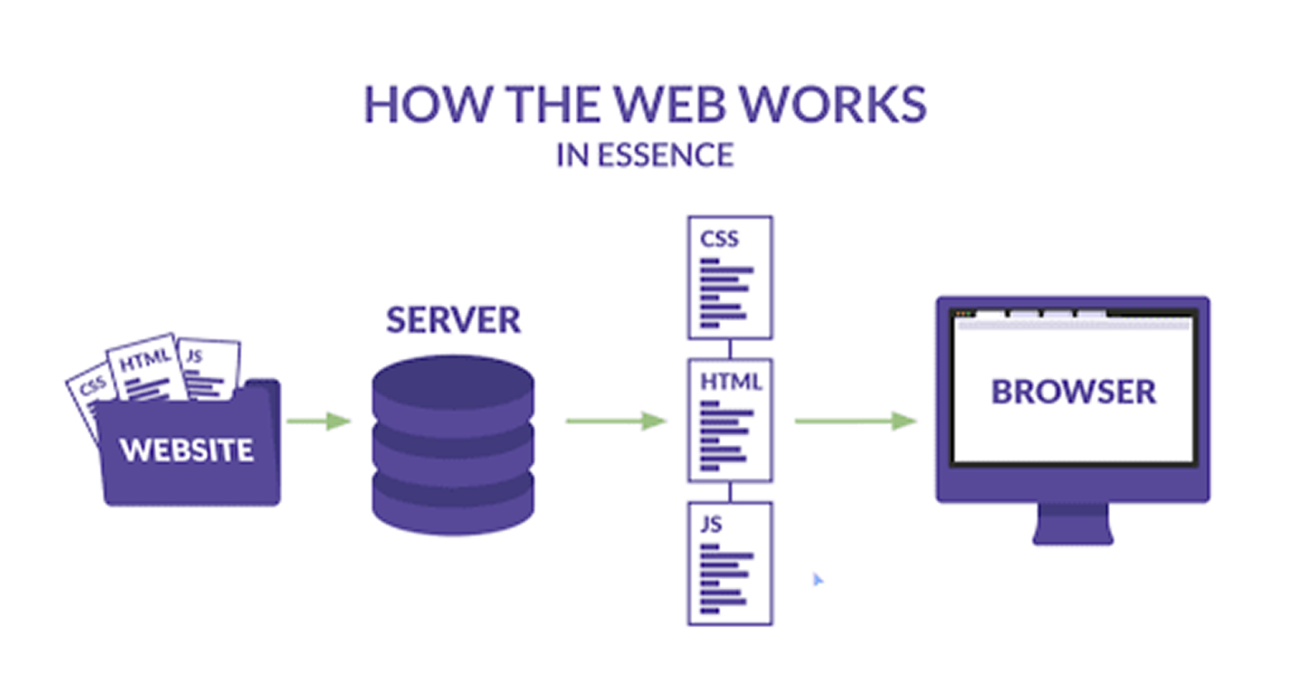
A web server is a system that receives requests from clients, such as web browsers, and responds with the requested content.
A server can store or access website resources and deliver them to visitors.
For example, when you request a webpage, the browser sends a request to the appropriate server.
The server processes the request and sends back the information needed to display the page.
What Is a Browser?
A web browser is software that allows you to access websites.
Popular browsers include:
- Chrome
- Safari
- Firefox
- Edge
The browser communicates with web servers and interprets the information it receives.
It then displays the webpage in a format that people can interact with.
What Happens When You Enter a Website Address?
Let’s break down the process.
Imagine you type:
example.com
into your browser.
Several things happen.
Step 1: The Browser Reads the Address
The browser identifies the domain and determines what resource you are trying to access.
Step 2: DNS Is Consulted
The browser or operating system determines the IP address associated with the domain.
Step 3: A Connection Is Established
Your device communicates with the appropriate server.
Secure websites typically use HTTPS to protect communication between your browser and the website.
Step 4: The Browser Sends a Request
The browser asks the server for the requested webpage.
Step 5: The Server Processes the Request
The server determines what information needs to be returned.
For a simple website, this might involve sending stored files.
For a more complex application, the server may need to run code or retrieve information from a database.
Step 6: The Server Sends a Response
The server sends information back to your browser.
This can include:
- HTML
- CSS
- JavaScript
- Images
- Fonts
- Other resources
Step 7: The Browser Builds the Page
The browser processes the files and turns them into the webpage you see.
This entire process can happen within seconds or less.
What Is HTML?
HTML stands for HyperText Markup Language.
HTML provides the basic structure of a webpage.
It can define elements such as:
- Headings
- Paragraphs
- Images
- Links
- Lists
- Tables
- Forms
- Buttons
You can think of HTML as the structural foundation of a webpage.
What Is CSS?
CSS stands for Cascading Style Sheets.
CSS controls how a webpage looks.
It can define:
- Colors
- Fonts
- Spacing
- Layout
- Borders
- Animations
- Responsive behavior
If HTML provides the structure, CSS provides much of the visual presentation.
What Is JavaScript?
JavaScript is a programming language commonly used to add interactive behavior to websites.
It can allow websites to:
- Respond to clicks
- Validate forms
- Update content
- Display animations
- Load information dynamically
- Create interactive interfaces
- Communicate with servers
Modern websites can use JavaScript to behave more like applications than traditional documents.
HTML, CSS and JavaScript Together
A simple way to understand the three technologies is:
HTML = Structure
CSS = Appearance
JavaScript = Behavior
For example, imagine a button.
HTML creates the button.
CSS determines its appearance.
JavaScript can determine what happens when you click it.
Together, these technologies can create interactive websites.
What Is a URL?
URL stands for Uniform Resource Locator.
It is the address used to locate a resource on the web.
A URL can contain several parts.
For example:
The main components include:
- https — communication protocol
- example.com — domain
- /products/phone — path
URLs can become more complex when they contain query parameters or other information.
What Is HTTPS?
HTTPS stands for HyperText Transfer Protocol Secure.
It provides encrypted communication between the browser and the website.
When you see a website beginning with:
https://
the connection uses HTTPS.
Encryption helps protect information while it travels between your device and the website.
This is particularly important when transmitting sensitive information such as passwords or payment details.
However, HTTPS alone does not mean that a website is trustworthy.
A malicious website can also use HTTPS.
What Is a Database?
Many modern websites need to store information.
A database can store things such as:
- User accounts
- Products
- Orders
- Articles
- Comments
- Customer information
- Settings
For example, when you log into an online shopping website, the website may retrieve your account information from a database.
Static vs Dynamic Websites
Websites can broadly be thought of as static or dynamic.
Static Websites
A static website typically delivers pre-created files to visitors.
These websites can be relatively simple and are often used for:
- Portfolio websites
- Company information
- Landing pages
- Documentation
- Simple blogs
Dynamic Websites
Dynamic websites can generate or retrieve content based on requests.
They may use:
- Databases
- Server-side programming
- APIs
- Authentication systems
- Content management systems
Examples include:
- Online stores
- Social media platforms
- Banking websites
- Travel booking platforms
Dynamic websites can provide personalized and interactive experiences.
What Is a Content Management System?
A Content Management System, or CMS, helps people create and manage website content without manually editing every piece of code.
A CMS can allow users to:
- Create articles
- Upload images
- Manage pages
- Organize categories
- Manage users
- Update content
WordPress is one well-known example of a CMS.
CMS platforms are widely used for blogs, business websites, news sites, and many other types of websites.
What Is an API?
API stands for Application Programming Interface.
An API allows different software systems to communicate with each other.
For example, a travel website might use APIs to retrieve:
- Flight information
- Hotel availability
- Weather information
- Currency data
- Maps
The website can then display that information to users.
APIs are an important part of modern web applications.
How Online Shopping Websites Work
An online store provides a good example of how multiple technologies work together.
When you visit an online store, you might:
- Browse products
- Search for an item
- Add it to your cart
- Enter your information
- Make a payment
- Receive an order confirmation
Behind the scenes, the website may interact with:
- Product databases
- User accounts
- Inventory systems
- Payment processors
- Shipping systems
- Analytics tools
The visible webpage is only one part of a much larger system.
How Websites Work on Mobile Devices
Modern websites are often designed to work across different screen sizes.
This is known as responsive web design.
A responsive website can adjust:
- Layout
- Text size
- Images
- Navigation
- Columns
- Buttons
depending on the device and screen size.
This allows the same website to provide a usable experience on desktops, tablets, and smartphones.
Why Website Speed Matters
When you visit a website, you expect it to load quickly.
Website speed can be affected by:
- Server performance
- Internet connection
- Image sizes
- JavaScript
- CSS
- Number of requests
- Database performance
- Third-party services
- Geographic distance from the server
Developers use various techniques to improve performance.
These can include:
- Image optimization
- Caching
- Content delivery networks
- Code optimization
- Compression
- Efficient database queries
What Is a CDN?
CDN stands for Content Delivery Network.
A CDN is a distributed network of servers designed to deliver content efficiently to users in different locations.
Instead of every visitor retrieving static resources from one central server, a CDN can serve certain content from a location closer to the user.
This can improve performance and reduce the load on the main server.
CDNs are commonly used for:
- Images
- Videos
- CSS files
- JavaScript files
- Other static resources
What Happens When You Log In?
Logging into a website involves additional processes.
You enter credentials such as a username and password.
The website verifies your information and establishes an authenticated session.
Modern websites use security mechanisms to help protect accounts.
Good account security practices include:
- Strong unique passwords
- Multi-factor authentication
- Secure password storage
- Regular software updates
- Monitoring for suspicious activity
How Websites Keep Information Secure
Website security involves multiple layers.
These can include:
- HTTPS encryption
- Authentication
- Access controls
- Firewalls
- Secure coding
- Software updates
- Monitoring
- Backups
- Security testing
No system is completely immune to security problems.
Website owners need to continuously monitor and improve their security practices.
Website vs Web Application
The terms website and web application are sometimes used interchangeably, but there is a useful distinction.
A traditional website may primarily provide information.
A web application is generally more interactive and allows users to perform actions.
For example:
Website: Read an article.
Web application: Book a flight, manage an account, edit a document, or transfer money.
Modern websites often combine both approaches.
The Basic Website Architecture
A simplified modern website can look like this:
User
↓
Web Browser
↓
Internet
↓
Web Server
↓
Application
↓
Database
The actual architecture can be much more complicated.
Large websites may use multiple servers, databases, APIs, caching systems, content delivery networks, authentication services, analytics systems, and other infrastructure.
Why Websites Need Servers
A website needs infrastructure capable of responding to requests.
When thousands or millions of people visit a website, the infrastructure needs to handle many requests simultaneously.
Large websites therefore often use multiple servers and distributed systems.
This allows them to handle:
- High traffic
- Large databases
- Millions of requests
- Global users
- Backups
- Failover
- Security requirements
Final Thoughts
A website may look simple when you open it in your browser, but many technologies can work together behind the scenes.
The basic process is:
Domain → DNS → Server → Request → Response → Browser → Webpage
HTML provides structure, CSS controls presentation, JavaScript adds interaction, servers process requests, databases store information, and networks connect everything together.
Once you understand these basic concepts, the web becomes much less mysterious.
The next time you type a website address into your browser, remember that the page appearing on your screen is the result of many different systems working together in a matter of seconds.